Solving Basecamp
Using AI to solve a long-standing problem with Garmin’s Basecamp and get my data back
Whilst walking on Dartmoor in 2011, thick fog descended and I came fairly close to getting lost. Fortunately, although it was a new area to me, I had a map, some experience and a brain, so I never felt I was truly in trouble. But I did start thinking that there must be a better way to know where I was. When I got home that night, I started researching and soon bought a Garmin Oregon 400. It was a great, rugged GPSr that not only told me where I was, but also recorded a perfect track of where I’d been. This opened up a new hobby for me: geocaching. I got slightly obsessed with it, and over the next decade I ended up walking over 1,200 miles, cycling some 4,607 miles and finding over 8,800 geocaches.
I found it really satisfying to collect all these GPX tracks and organise them using a free Windows tool by Garmin called Basecamp. This allowed me to create lists of tracks and display them over maps showing me where I’d been - and not been - allowing me to plan future trips and remember old ones.
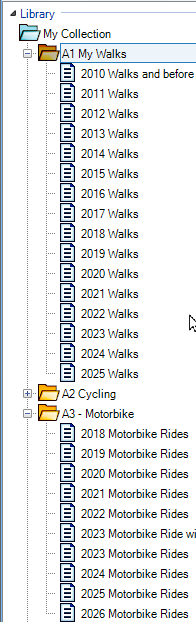
Some of my Basecamp lists
The problem
Sadly, Garmin officially discontinued Basecamp after a long period of reduced development. Whilst it’s still working today, it will eventually break and become unusable. So I’ll need to find something else - and, nowadays, there are some decent alternatives in the growing FOSS and self-hosted world.
My problem is that I added these tracks to Basecamp as standard .GPX files, but Basecamp stores them internally in a file called AllData.gdb, which is a proprietary database format. So I reviewed my options for getting my data back out again.
Option 1 - Export each track
Basecamp does have an option to export individual tracks back to GPX, and it works great. I have some 12,000-odd tracks stored now, and manually exporting them one by one is not going to be a fun task. I explored automated tools like mouse and keyboard clickers, but these seem very complicated to set up and prone to error.
Option 2 - Export each list
This was my best shot. Each list can be exported as a single big GPX file. One problem with this is that some tools I might want to use could break when dealing with a monolithic GPX containing hundreds or even thousands of individual tracks. Even so, I thought it would work, so I set about it. The first few lists exported fine, but soon I encountered a problem:
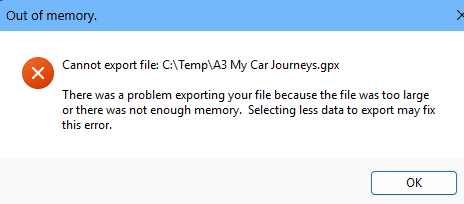
Basecamp’s export bug
Any list or group with “too many tracks” cannot be exported from Basecamp. This limit appears to occur after about a thousand of my tracks, and many of my groups contained more than that. And because Basecamp is no longer developed, Garmin is unlikely to fix this bug.
Option 3 - Convert the tracks using third-party tools
There is an excellent tool designed to convert GPS file formats called GPSBabel, and I spent an evening trying to get that working with my copy of Basecamp’s AllData.gdb. Unfortunately, although GPSBabel does have partial support for this proprietary database, it turns out that one of the last modifications made to Basecamp for its final 4.7 release was to change this database, including its version number. It seems that the first thing GPSBabel does is check that it recognises the file, and of course it doesn’t.
gpsbabel -t -i gdb -f C:/Temp/AllData.gdb -o gpx -F c:\temp\out.txt

gdb: Unknown or/and unsupported GDB version (-174.0)!
I suspect the version string has moved inside the file, resulting in this garbled version. So GPSBabel was out of the running.
I spent another evening looking around for alternative tools and even guides on doing what I wanted, to no avail.
Option 4
Try to reverse-engineer Garmin’s proprietary .gdb format myself.
Unfortunately, whilst I have been programming for getting close to half a century (and I wrote my first database in BBC BASIC back in 1985), my low-level knowledge is weak and I’d never done anything like that before.
Then I thought about AI and whether this might be an interesting challenge to give it.
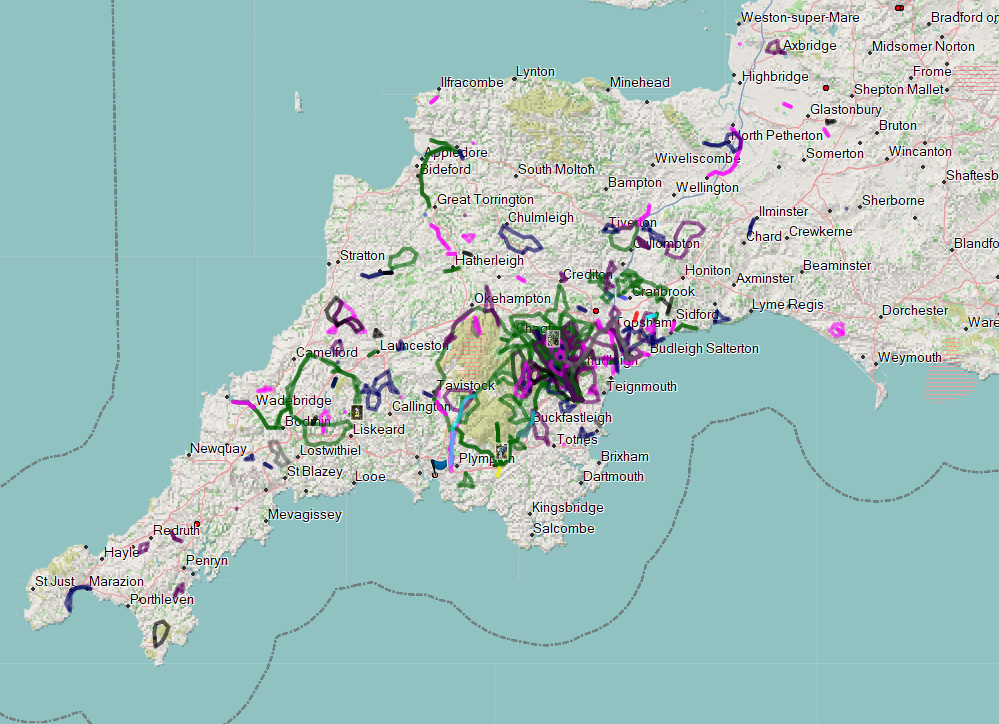
My cycling routes of South West England
LLM Saves the day…
I’ve been using AI a bunch at work to help with my job as a sysadmin, but I feel I’ve never yet mastered the art of prompting, and I wanted this to be fun, so I set myself four rules:
The Rules
- The objective is to export every track in AllData.gdb as a group of .GPX files in a new directory structure that matches the group and list names in Basecamp.
- I should not assist with the code itself; I should only issue prompts.
- I’ll let the LLM decide the language and whether Windows or Linux would be best.
- Use only free LLM accounts.
I chose Copilot, running in VS Code, using the free tier. For those who don’t know, Copilot will route questions to different LLMs.
The process
I tried to write good prompts, but in hindsight I was rather vague to start with. There was a lot of back and forth as I tried to overcome the LLM’s incorrect assumptions and backtrack when it made some poor choices. I’ve used Claude a fair bit at work, and that is much better at understanding the whole objective than I’ve found Copilot, Gemini and ChatGPT. But Claude was off the table here for Rule 4 - it’s not free.
Copilot was also very insistent about me going over previous ground, using GPSBabel, autoclickers and other things I had previously tried. I had to be very explicit in telling it that I wanted to reverse-engineer the database. I was half expecting guardrails to pop up and tell me that was illegal, but it was quite happy to try.
It searched the web to find documentation on the format, but there was nothing much out there.
It then asked for details about the list and group setup in Basecamp. I sent a few screenshots and it understood that. It then wanted some small metadata files and an example individual .GPX.
All this was reasonable and understandable - it needed to search for known strings to get a handle on the database structure.
I hit the free-tier limits twice during this and had to wait for them to cool down for 4 or 6 hours before progressing. When I did, it lost none of the context and things picked up just where I’d left off.
Then it produced a script in VS Code for me to try. It had chosen Python, ignoring my usual Perl preferences, but that was okay.
I read the script and it looked reasonable. Nothing obviously stood out as harmful, so I ran it on my Windows machine.
And… it worked.
PS C:\temp\basecamp> py .\export_basecamp47.py "$env:APPDATA\Garmin\BaseCamp\Database\4.7\AllData.gdb" --out "$env:USERPROFILE\Desktop\BaseCamp-GPX"
Exported 500 tracks...
Exported 1000 tracks...
Exported 1500 tracks...
Exported 2000 tracks...
Exported 2500 tracks...
Exported 3000 tracks...
Exported 3500 tracks...
Exported 4000 tracks...
Exported 4500 tracks...
Exported 5000 tracks...
Exported 5500 tracks...
Exported 6000 tracks...
Exported 6500 tracks...
Exported 7000 tracks...
Exported 7500 tracks...
Exported 8000 tracks...
Exported 8500 tracks...
Exported 9000 tracks...

Finished.
Track records found: 9230
GPX files written:   9229
Coordinates only:    8848
Segment count mismatches: 0
Tracks skipped:      1
Output directory:    C:\Users\digdilem\Desktop\BaseCamp-GPX
Log file:            C:\Users\digdilem\Desktop\BaseCamp-GPX\export_log.csv
Conclusion
This was a problem I’d tried to fix many times in the past, but hadn’t got far before hitting a seemingly unsolvable problem.
But by using free LLMs, I was able to get my data exported from Basecamp in a very usable and sorted format - exactly what I set out to do.
The finished code for this experiment is available on GitLab should you have a similar need or are just curious to see what was produced.